
Upcoming Events Widget
Purpose
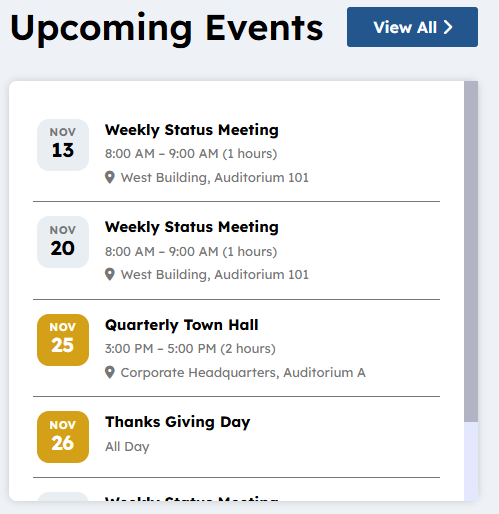
Display a number (set on the widget property) of upcoming events from a specified calendar. If preferred a widget property can be set “featured” (yes) which will display any upcoming events that are marked featured in the sites highlight tertiary color. There is a view all to the supporting calendar. If an event is selected the end user will navigate to the event detail where they can find out more and download the event to their personal calendar.
Features
-
- Display a specified number or events configured on the widget property from an associated calendar, the calendar list is configured on the widget property.
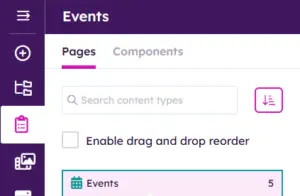
- Content on the OOTB Calendar is managed in the “Structured > Content” > Pages “Events” but additional calendars can be created and this widget can be configured to those calendars.
-
- There is an optional tag in the widget property to highlight the “Featured” items in the calendar in the sites tertiary color
- The View all is optional and if the field is not populated it will not display
- There is a widget property field used to navigate the user to a page that displays the full calendar.
- The title of the widget is configurable as a language token (expandable for multilingual) or literal example “Social Calendar”, “Upcoming Pickleball Events”….
Details
-
- Widget Name: UpcomingEventsWidget
- Available With: Release 7.0.2602.0321
- Content App Type: Authoring, Pages. Data comes from the configured Calendar which is supported in a “Structured Content” > Pages
- Content Type: AkuminaCalendar, AkuminaPersona, AkuminaSearch, AkuminaLanguage
- Content App Name: Events
- List Name: Calendar_AK
- Recommended Images Sizes: N/A
- Dependencies: N/A
Content
The Content displayed on this widget is populated by Content that has been created as “Structured Content” > Pages from AkuminaCalendar content type. Highlighted in BOLD are the columns used by UpcomingEventWidget.
| Title | Title of the calendar event in the Event Content App list |
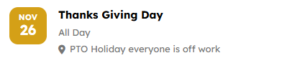
| Location | Display under the time of the event
|
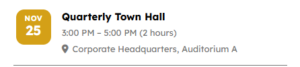
| Start Date | Date and time that show up on Upcoming Event Tile example: 3 pm is the start time and 5 pm is the end time example:
|
| End Date | Date and time that show up on the Upcoming event tile |
| All Day | If selected the the event will as all day
|
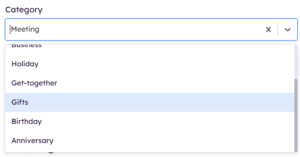
| Category | N/A on this Widget – They are only used as filters on the SingleCalendarWidget. These are SharePoint “Event” Content Type categories the options are :
Meeting Work hours Business Holiday Get-together Gifts Birthday Anniversary
This can be used on this widget to Filter Events if configured on the widget property.
|
| Description | Optional event description – N/A for this widget |
| StaticUrl | What will be added to the site Url to create the friendly Url for the news article |
| FriendlyUrl | This is a calculated field based upon the site you are viewing the content. It is used to populate FriendlyUrlSearch. After Save this field is what you copy and past into a quicklink type app to add the article to the site navigation. |
| FriendlyUrlSearch |
AkuminaSearch Content Type MUST be added to all “Structured Content” > Page supported list. This field is used to auto navigate by widgets such as Search, EventDetailWidget After the article has been SAVED this field will be auto populated. It is hidden. |
| Featured | When checked, event is shown as a featured event and shown with a featured tag highlighted in the sites tertiary color. |
| Body | Text that displays in the Event Details as the body of the event page N/A for this widget |
| EventTitle | If this is set then it is the Title to display as the Event Title and displayed this is optional and here for historical reasons. |
| Tags | Allows you to specify Tags associated with the event – N/A for this widget |
| Departments | Allows you to specify Departments associated with the event – N/A for this widget |
| Region | Allows you to specify Regions associated with the event – N/A for this widget |
| Meeting URL | Displays the event link for the location of the meeting to join the meeting when selected – N/A for this widget |
| Thumbnail URL | Allows you to specify an associated image and image description. – N/A for this widget |

Properties
| List Name | SharePoint list to read the data from to display | |
| Selected list columns | Columns in the SharePoint list that the widget is utilizing on the view:
ID,EventTitle,Title,EventDate,EndDate,Location,FriendlyUrl,FriendlyUrlSearch, Featured,fAllDayEvent,fRecurrence,RecurrenceData,Duration,XMLTZone |
|
| Additional selected list columns | This is for expansion | |
| featured | If Checked then highlight events that are marked “Featured” = YES in the sites tertiary color. | |
| View All Link | This is the *.aspx page that the “View All” will link to if not set then the “View All” will not link. By default set to eventlist.aspx, but this is to allow for additional calendar pages on using this widget. | |
| Displayed Title | This can be a language token for multilingual or a literal e.g. “Social Events”. Default is {upcomingevents.title} | |
| Cache Interval |
|
|
| # of Items to Display | This is the number of items to display 4 is default, if more than 4 and the number of items require more space than our card height set in the theme manager then a scrollbar will appear. | |
| Function to call after fetching data | OOTB -Blank (used for widget expansion): Name of the function called after data has been fetched by the widget. | |
| Function to call before binding the UI events | OOTB -Blank (used for widget expansion): Name of the function called before the UI has been rendered to the screen | |
| List is on Root Site | When checked, the widget references the list on root site | |
| Site Collection URL | Site collection URL where the SharePoint list defined in “List Name” can be found. | |
| widgetframework | react |
Views
View Name: UpComing Events
View Description: Display upcoming events from a specified calendar. Display a optional “View All” that will link to a full calendar page. Click on an event and navigate to the detail page to learn more about the event and download the event to your personal calendar.
View Preview: